 fairytale video
Make an ad
fairytale video
Make an ad
How to keep products and faces consistent in AI video
The most common failure in AI video ads isn't a strange hand or a glitchy background. It's drift: the label changes halfway through, the bottle gets taller, the necklace disappears, the face in the last second isn't quite the face in the first. This tutorial explains why that happens and how to prevent it with references, using a real product sheet and a real character from our library.
Why things drift
A video model fills every gap with a guess, many times a second. Give it one front photo of a bottle and it has to guess the back, the size and the label text from every angle. Give it one portrait and it has to guess the side of the face and everything below the shoulders. Each guess is plausible on its own; the trouble is that it can guess differently a moment later.
So the fix is to leave fewer gaps: show the model more of what's true, and say plainly what isn't known so nobody invents it.
Products: a sheet, not a photo
A product sheet puts everything known about a product on one reference image. Here's one for an unbranded amber serum bottle:
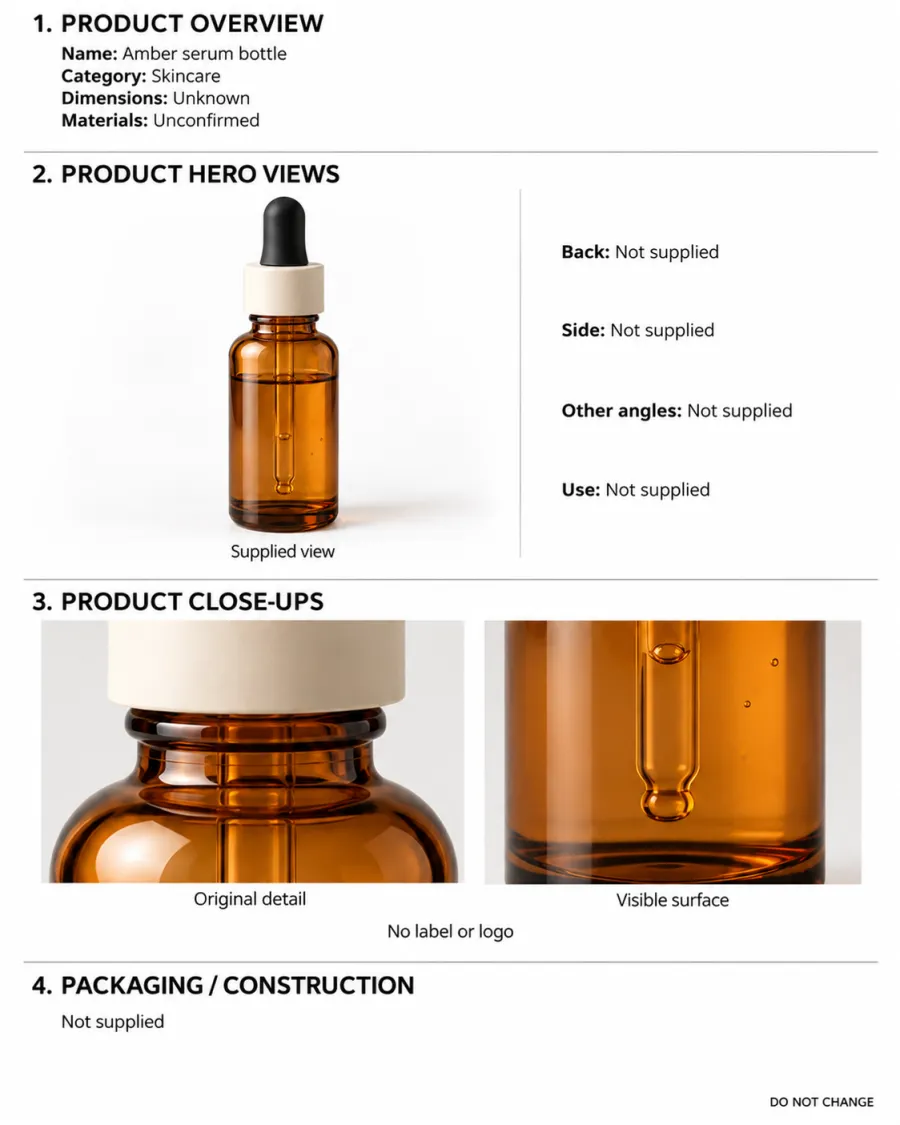
Look at what it does:
- It states the facts. Name and category are filled in. The dimensions say "Unknown" and the materials "Unconfirmed", because nobody supplied them.
- It shows the real view. The supplied front photo is the hero view, and the back, side, other angles and the product in use are marked "Not supplied" rather than drawn from imagination.
- It keeps the close-ups. The original detail of the dropper and neck, and the surface of the glass. This bottle has no label, and the sheet says that too, so the model has no reason to add one.
That honesty matters. A sheet that invented a back label would give the video model a confident, wrong reference, and the ad would show packaging that doesn't exist.
Product checklist
- A clean front photo of the whole product, evenly lit, label to camera.
- A separate close-up of the label or logo, the detail most likely to drift.
- Other angles only if you actually photographed them.
- The confirmed size, written into the plan relative to a hand: "a 30 ml bottle that fits between two fingers".
More on preparing product photos in how to turn a product photo into an AI video ad.
Faces: six views of one person
A person needs the same treatment. One portrait shows the face from the front only; turn the head and the model is guessing. A character sheet shows the same person from several angles, in one outfit, so every angle the video needs has a reference.
Here's where one of our library's characters came from. Chloe was made from the first frame of this reel:
From that single frame, the studio's character-sheet job drew her front portrait and a six-view sheet: front, left and right head-and-shoulders views on the top row, and full-length front, back and three-quarter views on the bottom row, all in the same headband and robe.
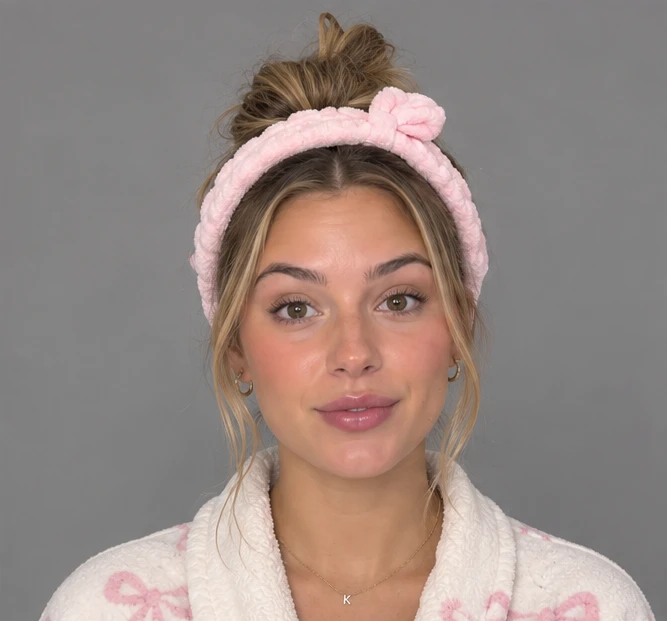
Two things to notice. First, small details such as the K pendant are kept deliberately; they're the first things to vanish when a reference is vague. Second, one frame doesn't show everything. Her legs and shoes weren't visible, so the full-length views had to fill them in. Whenever a sheet is made from a partial photo, check the parts the photo didn't show before you rely on them.
Character checklist
- Several angles of the same person, not one portrait.
- One outfit per sheet. For a different outfit, make a new look of the same face rather than describing new clothes in the prompt.
- Hair, head and shoes fully in frame, with plain margins, so nothing is cropped.
- A natural, realistic face. Over-perfect faces drift toward a generic "AI" look.
For how a character like this carries a whole ad, see AI UGC ads.
Scenes: one place, one look
For the setting, one clear image of the place plus a short style block is enough. Our style block has seven fields: lighting, palette, composition, grain, lens, ambience and location. Writing them down once and reusing them keeps a series of ads looking like they were shot in the same place on the same phone.
Bind the references in the prompt
References only help if the prompt says which is which. Name each one ("@product is Image 2, the product sheet") and use those names in every stage of the plan, with a continuity section that lists what must not change. The AI video ad prompt template shows the exact layout.
How to check for drift
- Pause on the first frame and the last frame and compare them side by side: face, hair, outfit, product.
- Step through the moments when the product is closest to the camera and read the label.
- Check one small detail all the way through, such as a necklace, a lid colour or a logo position.
- If something drifts, fix the reference that should have held it, then generate again.
Other signs that give AI video away are covered in how to make an AI video that looks real.
References in fairytale video
fairytale video is built around these three references. Upload product photos, then choose to generate a product sheet with GPT Image 2.5 for 5 credits; review the sheet and keep unknowns marked as unknown. Use a character from the library, such as Chloe, or make your own from photos or a description. Each new character sheet or new look also costs 5 credits. Scenes come from the library, your photos or a description, each with its style block; drawing a new scene reference costs 5 credits. Every paid Seedance 2.5 video keeps the exact references it was sent, so when something drifts you can see what the model had to work with.